
Smartsuit Pro II
RGMP data
Section titled “RGMP data”When the SDK streams a suit, the data goes out over RGMP. The suit’s Stream Definition Frame declares every stream it sends, and the names in that definition are the ones used in the sections below:
- Device definition covers
device_typeand the keys indevice_info. - Stream groups lists the
groupsand theirexpected_rate_hz. - Sensor frames are the values of
target_frameandreference_frame. - Streams lists the streams sent for each sensor.
- Status flags are the names in the
bit_mappingof eachSTATUS_FLAGSstream.
See the RGMP specification for definitions of measure_type, target_frame, reference_frame, and bit_mapping.
Device definition
Section titled “Device definition”device_type is "Smartsuit Pro II".
device_info contains:
| Key | Type | Description |
|---|---|---|
friendly_name | string | A display name. Use it for display only, and read device_type instead of parsing it. |
feature_bitmask | integer | Feature bits reported by the suit’s hub. See the table below. |
| Bit | Meaning |
|---|---|
| 1 | A left Smartglove is connected. |
| 2 | A right Smartglove is connected. |
| 3 | The suit is glove-ready. |
| 4 | Internal Rokoko information about the sensor hardware. |
To find out which sensors the suit sends, read the stream definitions rather than feature_bitmask.
The suit sends no static_data.
Stream groups
Section titled “Stream groups”The suit sends one group, default, with an expected_rate_hz of 100.
Reference frames
Section titled “Reference frames”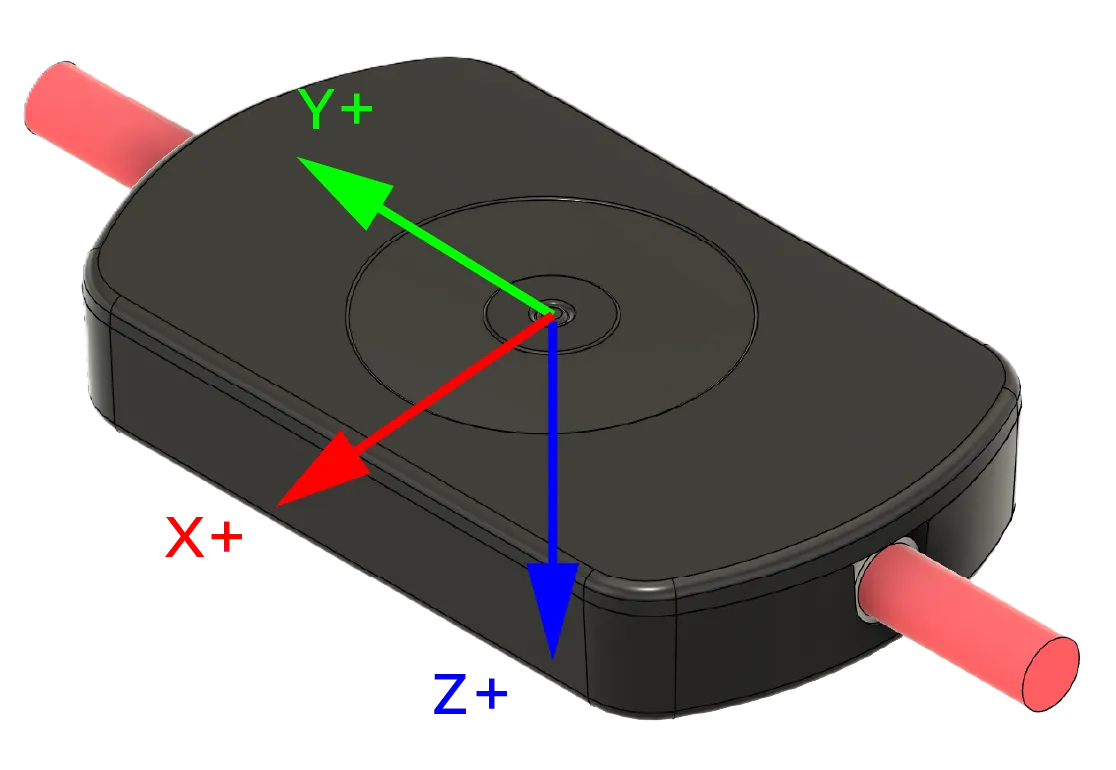
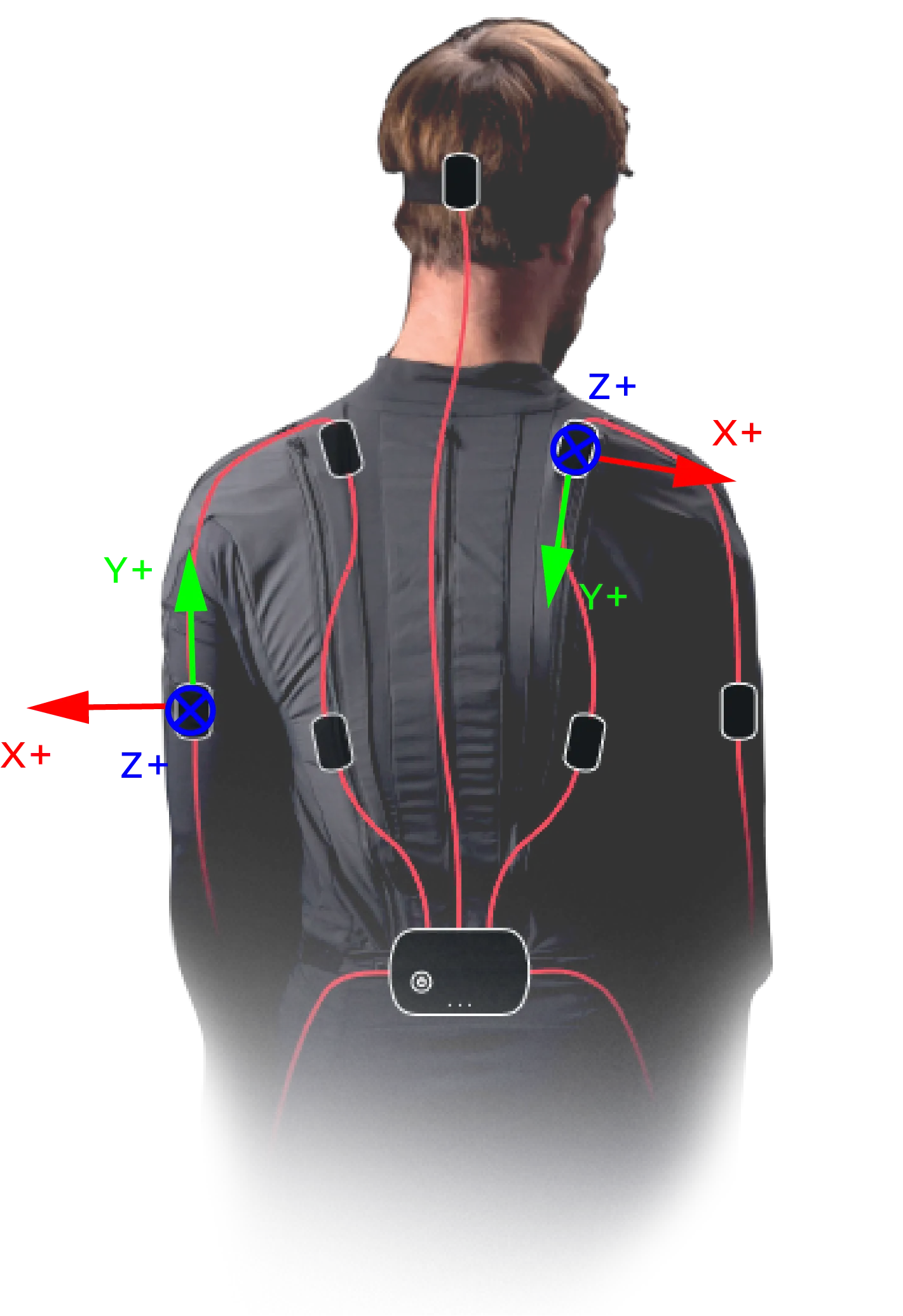
Note: the positive Y-axis points towards the cable that connects to the suit. See the image below for clarification.
Sensor Frames
Section titled “Sensor Frames”The table below lists the reference frames used in the Smartsuit Pro II data streams. In RGMP, these are the values of target_frame and reference_frame. Each sensor has a single frame; the suit has no separate IMU frames.
| Frame Name | Description |
|---|---|
head_sensor | The frame located at the head sensor. |
left_hip_sensor | The frame located at the left hip sensor. |
left_upper_leg_sensor | The frame located at the left upper leg sensor. |
left_lower_leg_sensor | The frame located at the left lower leg sensor. |
left_foot_sensor | The frame located at the left foot sensor. |
left_lower_back_sensor | The frame located at the left lower back sensor. |
left_shoulder_sensor | The frame located at the left shoulder sensor. |
left_upper_arm_sensor | The frame located at the left upper arm sensor. |
left_lower_arm_sensor | The frame located at the left lower arm sensor. |
left_hand_sensor | The frame located at the left hand sensor. Standalone suits only. |
right_hip_sensor | The frame located at the right hip sensor. |
right_upper_leg_sensor | The frame located at the right upper leg sensor. |
right_lower_leg_sensor | The frame located at the right lower leg sensor. |
right_foot_sensor | The frame located at the right foot sensor. |
right_lower_back_sensor | The frame located at the right lower back sensor. |
right_shoulder_sensor | The frame located at the right shoulder sensor. |
right_upper_arm_sensor | The frame located at the right upper arm sensor. |
right_lower_arm_sensor | The frame located at the right lower arm sensor. |
right_hand_sensor | The frame located at the right hand sensor. Standalone suits only. |
A standalone suit sends all 19 sensors. A glove-ready suit has a Smartglove in place of each hand sensor, so it sends the other 17. Each glove is a separate RGMP device, and its device_info.suit_device_id is the suit’s device_id. See the Smartgloves page for the glove’s streams.
Streams
Section titled “Streams”Each sensor sends the streams below in the default group. <sensor>_sensor stands for each frame in the table above. A blank reference_frame means the field is omitted, so the data is given in the sensor frame itself.
| measure_type | target_frame | reference_frame | Description |
|---|---|---|---|
ORIENTATION | <sensor>_sensor | LTP_NED | Orientation of the sensor. |
ANGULAR_VELOCITY | <sensor>_sensor | Gyroscope measurement. | |
PROPER_ACCELERATION | <sensor>_sensor | Accelerometer measurement. | |
MAGNETIC_FIELD | <sensor>_sensor | Magnetometer measurement. | |
STATUS_FLAGS | <sensor>_sensor | Status flags. |
A sensor that didn’t report in a frame is still written, because a group frame can’t be partial. Its values are zeros and its valid_data flag is clear.
Status flags
Section titled “Status flags”The Smartsuit Pro II data streams include status flags that indicate the tracking status of each sensor. In RGMP, they are sent as STATUS_FLAGS streams, and the flag names below are the names in each stream’s bit_mapping. Read the bit position from bit_mapping rather than hard-coding it. The meaning of each flag is elaborated in the table below.
| Bit | Flag Name | Description |
|---|---|---|
| 0 | valid_data | Whether the sensor reported in this frame. When this is false, the sensor’s values are zeros. |
| 2 | is_magnetometer_saturated | Whether at least one axis of the magnetometer is saturated. |
| 3 | not_is_accelerometer_used | Whether the accelerometer is not being used in the sensor fusion. This will be true when the sensor is accelerating. |
| 4 | is_accelerometer_saturated | Whether at least one axis of the accelerometer is saturated. |
| 6 | is_gyroscope_saturated | Whether at least one axis of the gyroscope is saturated. |
| 7 | not_is_magnetometer_used | Whether the magnetometer is not being used in the sensor fusion. This will be true when the sensor is experiencing strong magnetic interference. |
Calibration
Section titled “Calibration”The calibration for the Smartsuit Pro II sensors initializes the orientation relative to gravity and the local magnetic field. This requires the sensor to be at a standstill. Calibration is not part of RGMP: it is triggered through RCSP.
IMPORTANT
For best results, ensure that the sensor is not close to any large metal objects or sources of magnetic interference during calibration, as these can distort the magnetic field and lead to inaccurate orientation estimates.
To trigger this calibration, call the CalibrateStaticPose command in RCSP.