
Smartgloves
The documentation below applies both to the Smartgloves and the Smartgloves II, unless otherwise noted.
Each glove is fitted with five finger sensors, an arm sensor, and a central hub. The finger sensors sit on the back of the fingers, on the middle segment of each of the four fingers and on the proximal segment of the thumb. The hub is the central unit on the back of the hand (centered at the circular Rokoko logo) and contains the EMF transmitter. The arm sensor is located on the forearm near the wrist.
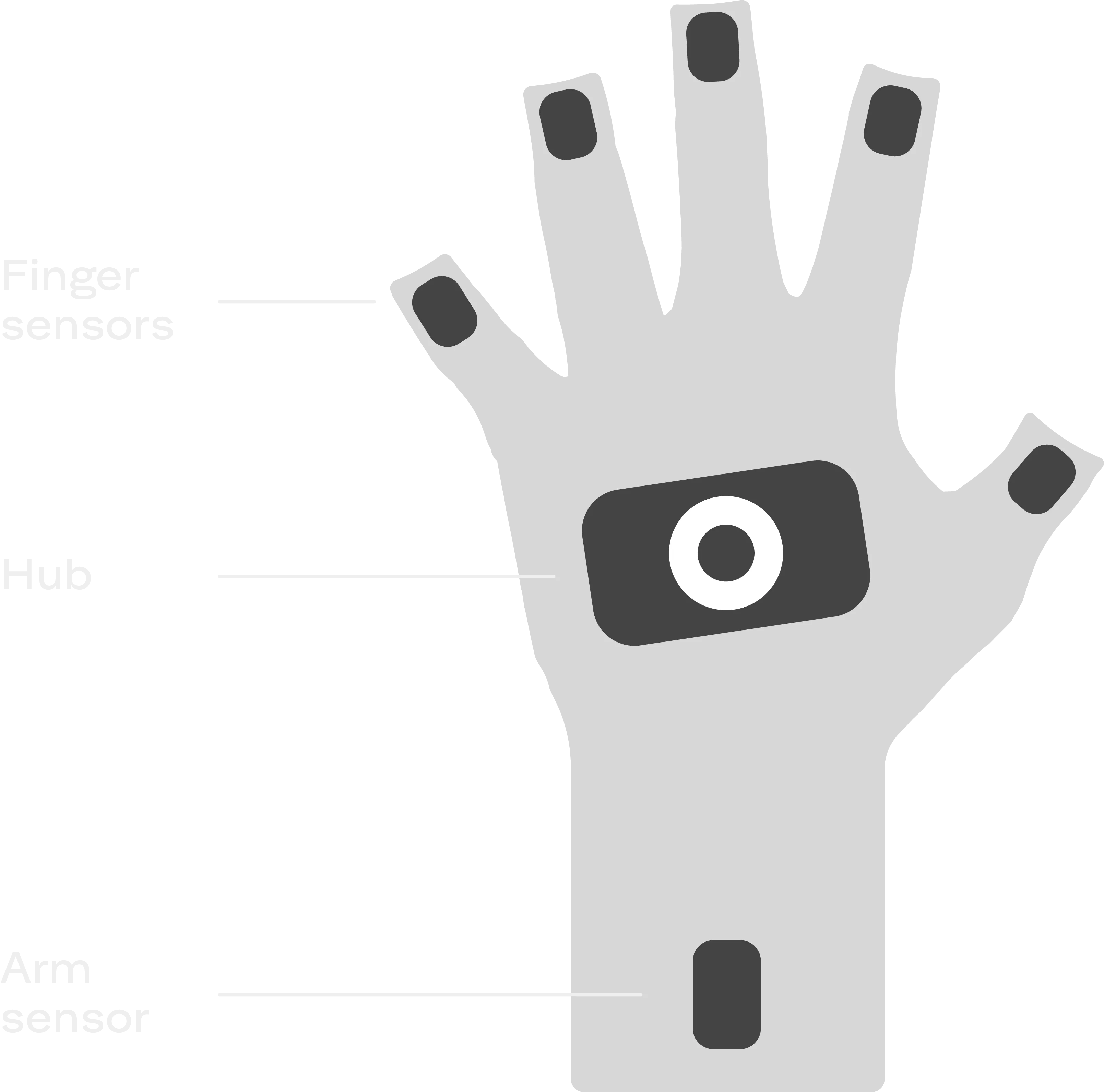
Datasheets
Section titled “Datasheets”- Smartgloves Technical Specifications (PDF)
- Smartgloves II Technical Specifications (PDF)
- Smartgloves I / II Comparison (PDF)
Feature support
Section titled “Feature support”Availability of key SDK features across the two Smartgloves generations:
| Feature | Smartgloves I | Smartgloves II |
|---|---|---|
| Button press | ✗ | ✓ |
| Customizable LED | ✗ | ✓ |
| USB data streaming | ✗ | ✓ |
| Wi-Fi streaming | ✓ | ✓ |
| Magnetometer support | ✗ | ✓ |
| EMF coil range | Medium range | Long range |
RGMP data
Section titled “RGMP data”When the SDK streams a glove, the data goes out over RGMP. The glove’s Stream Definition Frame declares every stream it sends, and the names in that definition are the ones used in the sections below:
- Device definition covers
device_typeand the keys indevice_info. - Stream groups lists the
groupsand theirexpected_rate_hz. - Reference frames are the values of
target_frameandreference_frame. - Streams lists every stream in the
defaultgroup. - Status flags are the names in the
bit_mappingof eachSTATUS_FLAGSstream. - Static data describes the
static_dataentries. - EMF diagnostics is the
emf_onlystream group.
See the RGMP specification for definitions of measure_type, target_frame, reference_frame, custom_label, and bit_mapping.
Device definition
Section titled “Device definition”Each glove is its own RGMP device with its own device_id, so a pair of gloves shows up as two devices.
device_type is one of:
device_type | Device |
|---|---|
"Smartgloves" | Smartgloves |
"Smartgloves II" | Smartgloves II |
device_info contains:
| Key | Type | Description |
|---|---|---|
friendly_name | string | A display name, such as "Smartgloves (left)" or "Smartgloves II (right)". Use it for display only, and read device_type and hand instead of parsing it. |
hand | string | "left" or "right". This is the field to read for the glove’s handedness. |
suit_device_id | integer | Present only when the glove is connected through a Smartsuit Pro II. It is the device_id of that suit. |
Stream groups
Section titled “Stream groups”| Group | expected_rate_hz | Present |
|---|---|---|
default | 83.33 (250/3) | Always. |
emf_only | 83.33 (250/3) | Smartgloves II only. See EMF diagnostics. |
Reference frames
Section titled “Reference frames”The reference frames are defined such that when the glove is lying flat, all coordinate axes are aligned.
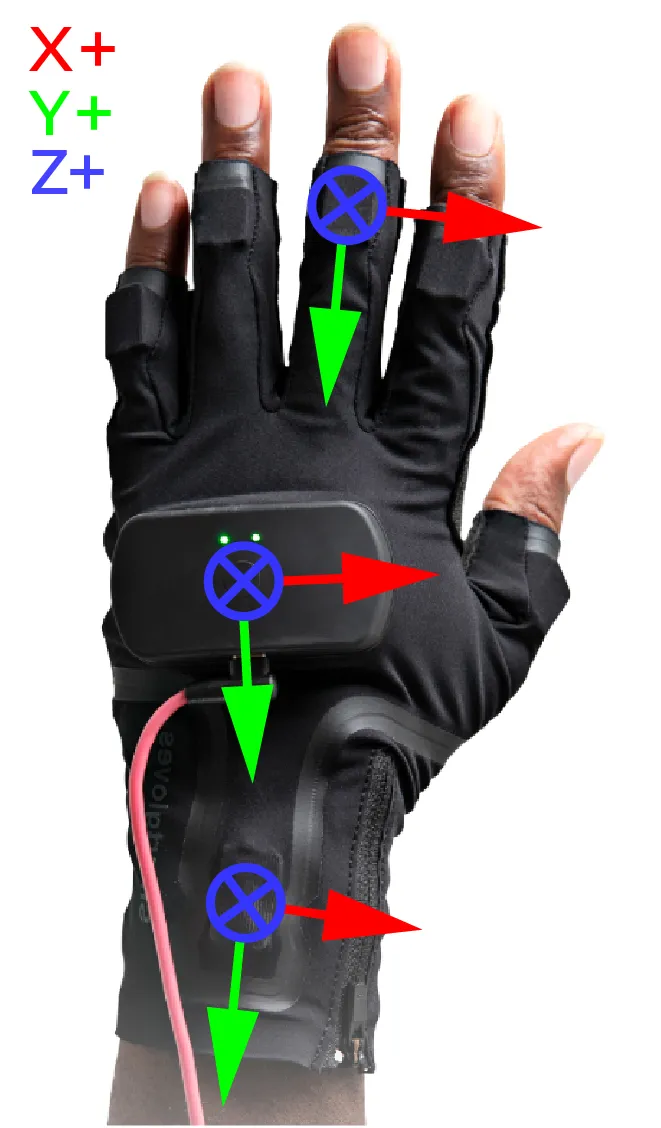
The Coil Pro reference frames are defined in the images below. Note, the direction of the positive X/Y axes are ambiguous in the tracking data; the two possibilities differ by a 180 degree rotation around the Z-axis. (see 180 degree rotation ambiguity for an option to resolve this)
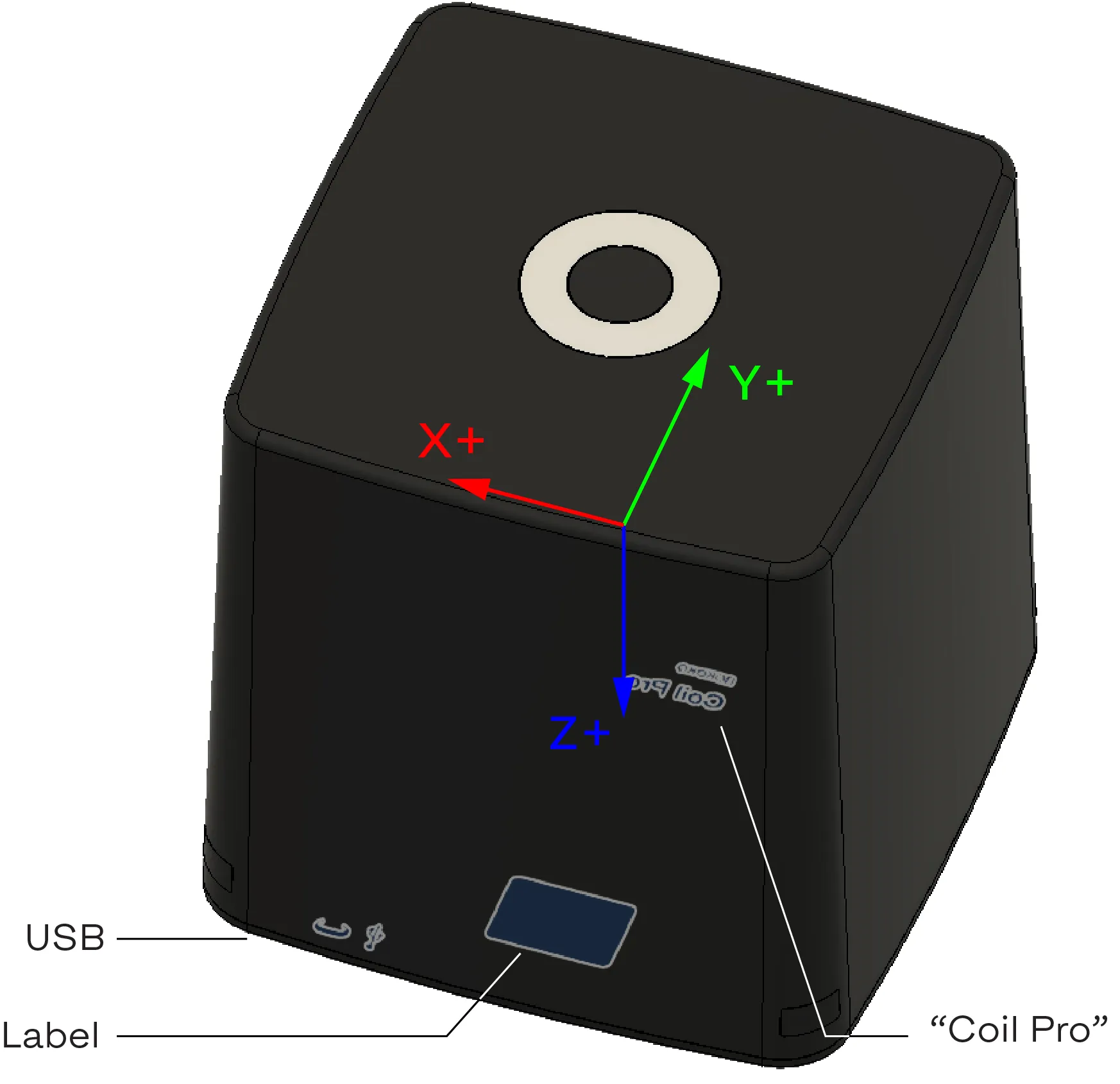
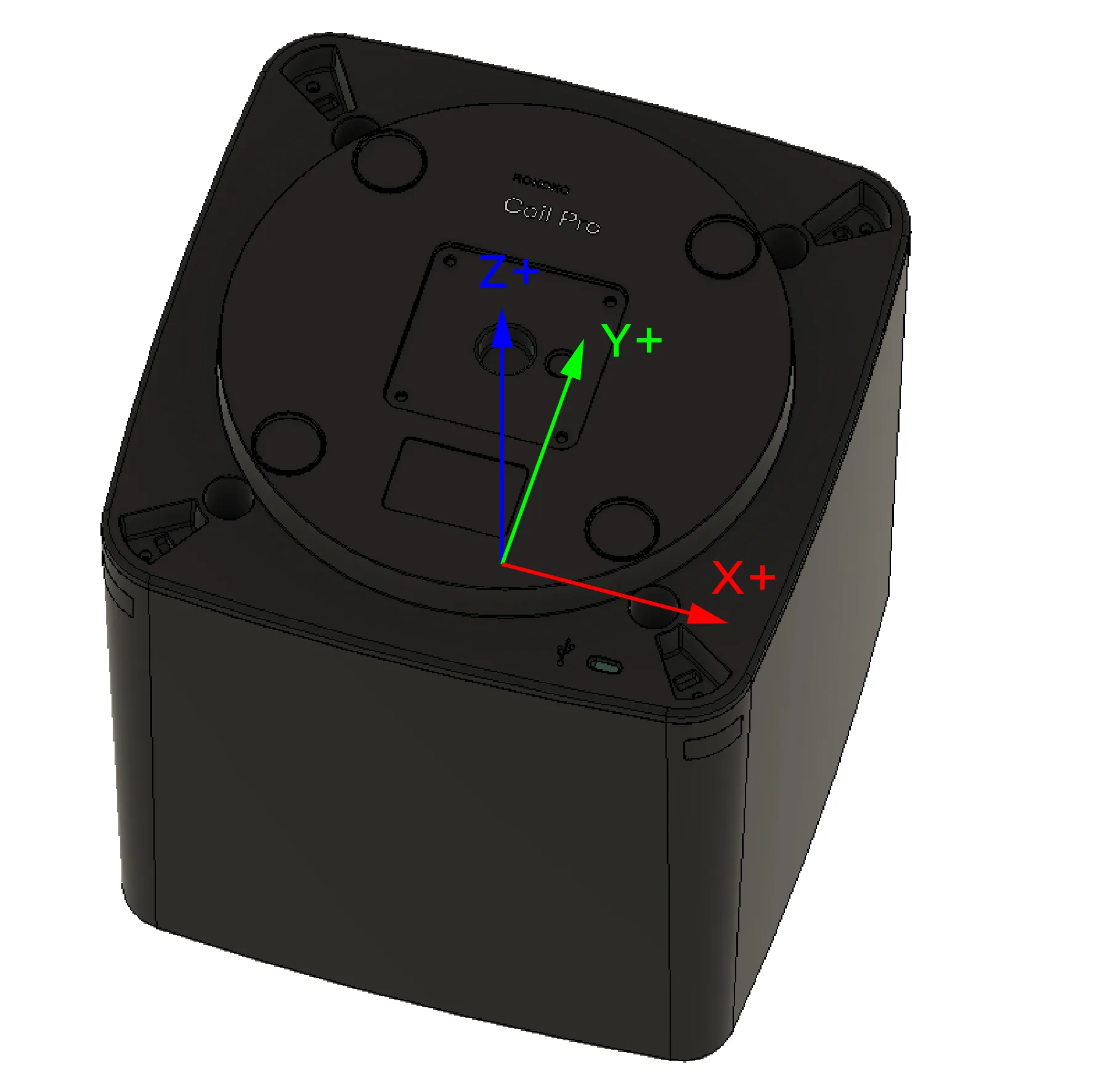
The table below lists all reference frames used in the Smartgloves data streams. In RGMP, these are the values of target_frame and reference_frame.
| Frame Name | Description |
|---|---|
hub | The central frame of the Smartgloves, centered at the circular Rokoko logo. |
thumb_finger_sensor | The frame of the sensor located on the thumb. |
index_finger_sensor | The frame of the sensor located on the index finger. |
middle_finger_sensor | The frame of the sensor located on the middle finger. |
ring_finger_sensor | The frame of the sensor located on the ring finger. |
little_finger_sensor | The frame of the sensor located on the little finger. |
arm_sensor | The frame of the sensor located on the forearm, near the wrist. |
coil_pro | The frame located at the center of the Coil Pro. |
The hub and each sensor also have an IMU frame, the frame of the IMU chip inside the housing. The raw IMU measurements are given in these frames:
| Frame Name | Description |
|---|---|
hub_imu | The IMU inside the hub. |
thumb_finger_imu | The IMU inside the thumb sensor. |
index_finger_imu | The IMU inside the index finger sensor. |
middle_finger_imu | The IMU inside the middle finger sensor. |
ring_finger_imu | The IMU inside the ring finger sensor. |
little_finger_imu | The IMU inside the little finger sensor. |
arm_imu | The IMU inside the arm sensor. |
The static data also gives the offset of each IMU from the origin of its housing frame.
Streams
Section titled “Streams”The default group contains the streams below. <sensor> stands for each of thumb_finger, index_finger, middle_finger, ring_finger, little_finger, and arm. A blank reference_frame means the field is omitted, so the data is given in the target frame itself.
| measure_type | target_frame | reference_frame | custom_label | Description |
|---|---|---|---|---|
TRANSFORM | <sensor>_sensor | hub | Fused pose of the sensor relative to the hub. | |
ANGULAR_VELOCITY | <sensor>_imu | Gyroscope measurement. | ||
PROPER_ACCELERATION | <sensor>_imu | Accelerometer measurement. | ||
STATUS_FLAGS | <sensor>_sensor | Sensor flags. | ||
ORIENTATION | hub | LTP_NED | Orientation of the hub. The hub has no position, so this is an orientation only. | |
ANGULAR_VELOCITY | hub_imu | Gyroscope measurement. | ||
PROPER_ACCELERATION | hub_imu | Accelerometer measurement. | ||
MAGNETIC_FIELD | hub | Smartgloves II only, and only when enabled through an experimental feature. | ||
STATUS_FLAGS | hub | Hub flags. | ||
TRANSFORM | arm_sensor | coil_pro | Pose of the arm sensor relative to the Coil Pro. | |
CUSTOM | arm_sensor | coil_pro | relative_emf_residual | Relative EMF residual of the Coil Pro solution. |
STATUS_FLAGS | arm_sensor | coil_pro | Coil Pro flags. |
Whether the hub MAGNETIC_FIELD stream is declared is decided once, when the definition frame is built. It does not come and go during a session.
The Coil Pro streams are always declared, whether or not a Coil Pro is connected. Check the is_coil_pro_present flag to tell whether the Coil Pro pose is valid.
NOTE
The arm sensor has two poses in the same group: one relative to hub and one relative to coil_pro. Both use target_frame: "arm_sensor", and only reference_frame tells them apart, so always match on both fields.
Status flags
Section titled “Status flags”The Smartgloves data streams include status flags that indicate the tracking status of each sensor. In RGMP, they are sent as STATUS_FLAGS streams, and the flag names below are the names in each stream’s bit_mapping. The meaning of each flag is elaborated in the table below.
| Flag Name | Description |
|---|---|
is_magnetometer_saturated | Smartgloves II only. Whether at least one axis of the magnetometer is saturated. |
is_accelerometer_saturated | Whether at least one axis of the accelerometer is saturated. |
is_gyroscope_saturated | Whether at least one axis of the gyroscope is saturated. |
is_emf_saturated | Whether at least one axis of the electromagnetic field sensor (EMF) is saturated. |
not_is_accelerometer_used | Whether the accelerometer is not being used in the sensor fusion. |
is_coil_pro_present | For Coil Pro tracking. Indicates whether the Coil Pro has been detected. When this is false, the given pose relative to the Coil Pro is not reliable. |
emf_flip_decided | For Coil Pro tracking. Indicates whether the system has decided on the ambiguity in EMF initialization |
is_heading_reliable | Smartgloves II only. For the provided hub orientation, which is relative to the local tangent plane (LTP). Indicates whether the heading (yaw) component of the orientation is reliable. This is false when the system has not yet converged on the heading estimate. |
Each STATUS_FLAGS stream declares only the flags that apply to it. The table below shows which stream declares which flag.
| Flag Name | Sensor (<sensor>_sensor) | Hub (hub) | Coil Pro (arm_sensor in coil_pro) | EMF-only (emf_only group) |
|---|---|---|---|---|
is_emf_saturated | ✓ | – | ✓ | ✓ |
is_magnetometer_saturated | – | ✓ | – | – |
not_is_accelerometer_used | – | – | ✓ | – |
is_accelerometer_saturated | ✓ | ✓ | ✓ | – |
is_gyroscope_saturated | ✓ | ✓ | ✓ | – |
is_coil_pro_present | – | – | ✓ | – |
emf_flip_decided | – | – | ✓ | – |
is_heading_reliable | – | ✓ | – | – |
IMPORTANT
Bit positions differ between streams and may change between SDK versions. Look up each flag’s bit in the stream’s bit_mapping in the definition frame rather than hard-coding it.
Static data
Section titled “Static data”The glove’s static_data contains two kinds of entries:
| measure_type | target_frame | reference_frame | custom_label | Description |
|---|---|---|---|---|
TRANSFORM | hub_imu | hub | Fixed offset of the hub IMU inside the hub. | |
TRANSFORM | <sensor>_imu | <sensor>_sensor | Fixed offset of each sensor’s IMU inside its housing. | |
CUSTOM | hub, <sensor>_sensor, coil_pro | OBB | Oriented bounding box of the housing, as FLOAT[10]: center (x, y, z), orientation quaternion (x, y, z, w), half-extents (x, y, z). |
Positions and extents are in meters.
EMF diagnostics
Section titled “EMF diagnostics”The emf_only stream group provides additional insight into the hub-based EMF tracking. It is sent by the Smartgloves II, which uses a sensor fusion that produces an EMF-only estimate. The Smartgloves (I) uses an older fusion algorithm that doesn’t, so it doesn’t send this group. A Smartgloves II doesn’t send it either when the older algorithm is forced through an experimental feature. The group includes the following streams, for each of the five finger sensors and the arm sensor:
| measure_type | target_frame | reference_frame | custom_label | Description |
|---|---|---|---|---|
TRANSFORM | <sensor>_sensor | hub | EMF-only pose for the given sensor. | |
CUSTOM | <sensor>_sensor | hub | relative_emf_residual | Relative EMF residual for the given sensor. |
STATUS_FLAGS | <sensor>_sensor | is_emf_saturated. |
The TRANSFORM and STATUS_FLAGS keys are the same as in the default group. They are a second estimate of the same quantity, and the group name is what tells them apart.
The following sections describe the meaning of the EMF-only pose and the relative EMF residual.
EMF-only pose
Section titled “EMF-only pose”The estimated pose derived only from EMF. This pose is not fused with the IMU data, and is provided for diagnostic purposes. It carries minimum delay, but is more susceptible to noise and interference. There is zero correlation between consecutive EMF-only poses, and the pose may jump around when the EMF signal is weak or noisy.
Relative EMF residual
Section titled “Relative EMF residual”The EMF pose estimation is based on a model of the EMF field generator by the transmitter (hub or Coil Pro). The residual is the difference between the measured EMF and the expected EMF based on the model. A large residual indicates that the measured EMF does not match the expected EMF, which can be caused by interference or other factors.
We provide the relative EMF residual for each sensor as a percentage, which is the ratio of the residual magnitude to the expected EMF magnitude. A relative EMF residual of 0% indicates a perfect match, while a relative EMF residual of 100% indicates that the residual magnitude is equal to the expected EMF magnitude. Note, the relative EMF residual has no upper bound, and can exceed 100%.
Calibration & Initialization
Section titled “Calibration & Initialization”While there is no calibration command for the Smartgloves, there are initialization procedures that run automatically and these are important to understand for optimal use of the device. These procedures are not part of RGMP: they are controlled through RCSP commands and SDK command line options. Their progress shows up in the RGMP data as status flags.
Hub magnetometer initialization (Smartgloves II only)
Section titled “Hub magnetometer initialization (Smartgloves II only)”When the Smartgloves II connects to the Rokoko SDK, the hub’s magnetometer undergoes an initialization procedure to determine the orientation relative to the local magnetic field. This is a critical step for accurate heading estimation. During this initialization, the hub orientation estimate is available, but the flag is_heading_reliable (see table above) will be false until the initialization is complete and the heading estimate has converged. For best results, ensure that the hub is not close to any large metal objects or sources of magnetic interference during this initialization, as these can distort the magnetic field and lead to inaccurate orientation estimates. The initialization requires rotation of the hub.
This initialization is not always required, as the magnetometer parameters are persisted in the Rokoko SDK. If the persisted parameters are valid, the initialization will be skipped and the heading estimate will be reliable immediately upon connection.
Coil Pro pose ambiguity & initialization
Section titled “Coil Pro pose ambiguity & initialization”The Coil Pro relative tracking has some pose ambiguity, of which some are resolved automatically by the SDK, and some can be resolved by the user. We refer to the two ambiguities as:
- 180 degree rotation ambiguity: an ambiguity in the EMF sensor data that can result in a 180 degree rotation around the Z-axis. This ambiguity can be resolved by specifying which half-space of the Coil Pro the gloves are initialized on. See the section below for details.
- EMF flip ambiguity: an ambiguity in the sign of the z-axis coordinate, which the SDK resolves automatically on initialization using the sensor IMU.
180 degree rotation ambiguity
Section titled “180 degree rotation ambiguity”The SDK can resolve this ambiguity if you specify which half-space of the Coil Pro the gloves are initialized on, via a command line option.
To use this feature, run the SDK with the --coil-half-space (or -chs for short) command line option. The option takes one of the following values:
| Option | Assumption |
|---|---|
auto (default) | No assumption; the initial pose may be rotated 180 degrees around the Z-axis (previous behavior). |
x-pos | initialized on the positive X half-space of the Coil Pro. |
x-neg | initialized on the negative X half-space of the Coil Pro. |
y-pos | initialized on the positive Y half-space of the Coil Pro. |
y-neg | initialized on the negative Y half-space of the Coil Pro. |
EMF flip ambiguity
Section titled “EMF flip ambiguity”When the Smartgloves arm EMF-sensor detects the Coil Pro for the first time, an automatic initialization procedure is triggered. This initialization resolves the EMF flip ambiguity in the EMF sensor data to determine a correct initial pose of the gloves relative to the Coil Pro. To resolve the ambiguity, the procedure uses the IMU data, and some linear acceleration is required. Before such movement has been performed, the emf_flip_decided flag will be false, and the vertical (z-axis) position may be inverted. Once the initialization is complete, the emf_flip_decided flag will be true, and the pose relative to the Coil Pro will be stable. For best results, perform a deliberate linear movement of the gloves (e.g. a quick shake) after the first detection of the Coil Pro to expedite this initialization.
IMPORTANT
If the arm EMF-sensor saturates or comes outside of Coil Pro range, this initialization will reset and the EMF flip ambiguity will be unresolved again. Therefore, for best results, stay in the operating range of the Coil Pro. See the EMF section of the technology overview guide for more details.
Re-initialization
Section titled “Re-initialization”The sensor fusion algorithms can be re-initialized at any time by calling the ReinitAlgo command in RCSP.